
Backups and restore testing
Design recoverable backups around independent failure boundaries, required keys, restore objectives, and realistic service validation.
A backup is a recovery capability
A backup preserves data or configuration for later recovery. Its practical value depends on whether the organization can retrieve it, trust it, and use it to restore the required service. A successful copy job demonstrates one step; it does not prove a complete recovery will work.
Start with the failure being planned for. Accidental deletion, storage failure, account compromise, and a broader outage can affect recovery copies differently. A design should explain why the same failure will not remove both the working data and the only usable backup.
One account controls every copy
Imagine a fictional academy backs up its enrollment database to another storage location every night. The application administrator can modify production data and delete every backup. A second location exists, but the administrator account remains a shared point of failure.
If that account is misused, both the working database and its recovery history may be affected. The academy reviews separate permissions, appropriate retention protections, administrative access, and the dependencies needed to recover. The purpose is not to collect as many copies as possible; it is to preserve usable recovery options under the chosen failure scenarios.
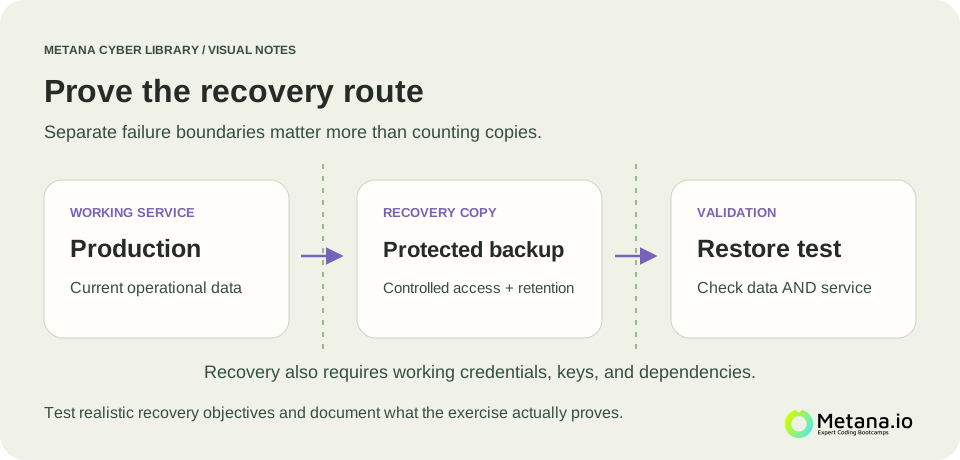 Production data, protected backup storage, and a restore test should have distinct roles, with recovery credentials and encryption keys available through a controlled route. Open full-size diagram ↗
Synchronization can copy the mistake
A synchronized folder can be useful, but synchronization may propagate deletion or harmful changes to another device. Whether it supports recovery depends on version history, retention, access, and the behavior of the service. Do not assume a second synchronized view is an independent recovery copy.
For the academy, an important question is whether it can restore the database to a point before an unwanted change. Another is whether it can identify a suitable clean point when Ransomware or unauthorized modification is suspected.
Recovery needs more than data files
A restored database may still depend on application configuration, software compatibility, identities, network access, and encryption keys. If the keys were available only through the failed environment, encrypted backups can become inaccessible exactly when needed. Key management belongs in the recovery design.
The team should record these dependencies and test them under realistic conditions. A controlled recovery environment can reveal missing credentials or undocumented steps without replacing the live service during an exercise.
Define what the restore test must demonstrate
RTO and RPO helps distinguish acceptable data loss from acceptable recovery time. In a test, record the recovery point selected, the elapsed time, and whether the application works with the restored information. Check meaningful business behavior, such as opening an enrollment record and generating an expected report.
A tiny sample can validate a particular step but may not demonstrate that a large production service can be restored within the same time. State the scope of the exercise and the conclusions it supports.
Turn findings into maintained instructions
Suppose the first test succeeds only because a long-serving engineer remembers an undocumented key permission. Record and resolve that dependency rather than declaring the process finished. Repeat relevant checks after important architecture or access changes.
Continue with Disaster recovery for the wider service-restoration plan. A useful backup strategy combines protected copies, controlled access, known dependencies, and evidence that the required service can actually be recovered.
References & further reading
Original explanations, with primary references for deeper study.
NIST: Contingency Planning GuideNIST: Contingency Planning Guide, SP 800-34 Rev. 1